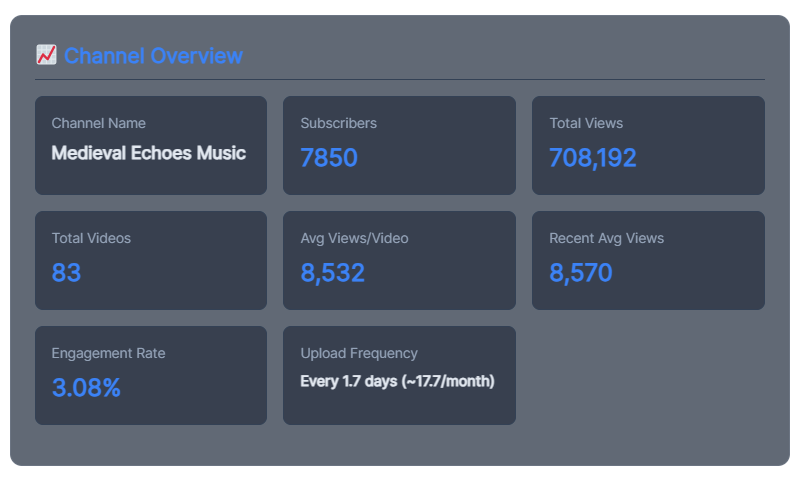
📊 YouTube Channel Analyzer
Professional analytics for your YouTube channel
Analyzing channel data…
Why You Only See 2 Countries:
The “Video Views by Country” feature works by scanning video titles and descriptions for country keywords. It’s not getting actual YouTube Analytics data (which requires YouTube Studio access).
In your case:
- United States appears in 50 videos (1.27M views)
- Italy appears in 19 videos (524K views)
- Other countries are not mentioned in your video titles/descriptions
How It Works:
The tool searches for keywords like:
- “USA”, “New York”, “California” → United States
- “Rome”, “Milan”, “Venice” → Italy
- “London”, “Manchester” → United Kingdom
- etc.
So it only detects countries that are explicitly mentioned in video titles or descriptions.
In the golden age of digital video, thousands of hours of content are uploaded to YouTube every single minute. For creators, brands, and digital marketers, this reality presents a massive challenge: How do you cut through the noise and ensure your channel survives?
YouTube Channel Analyzer Pro: The Ultimate Guide to Auditing Content, Tracking Competitors, and Exploding Channel Growth
Many creators rely entirely on gut feelings. They guess which thumbnails work, assume they know what their audience likes, and blindly upload videos hoping the algorithm will bless them with viral fame. This approach is a recipe for creative burnout and flatlining subscriber counts.
Successful channels don’t guess—they analyze.
To scale efficiently, you need deep, actionable data. You need to know what your competitors are doing right, where your own content is leaking viewers, and how to optimize your metadata to feed the algorithm exactly what it wants. This is where a YouTube Channel Analyzer Pro tool becomes an indispensable asset. Let’s explore how to run a pro-level channel audit, decode competitor strategies, and turn raw data into explosive organic growth.
1. What is a YouTube Channel Analyzer Pro Tool?
A YouTube Channel Analyzer Pro tool is a comprehensive diagnostic platform that pulls public and API-driven performance data from any YouTube channel. Unlike standard, internal YouTube Studio analytics—which only show you data for your own channel—an external analyzer allows you to examine any channel on the platform.
[Raw YouTube API Data] ──> [Analyzer Pro Engine] ──> [Actionable Competitive Insights]
This capability transforms data into a powerful competitive intelligence weapon. A pro analyzer looks at a channel’s macro and micro-metrics, including:
- Historical subscriber growth velocities.
- Video upload cadences and timing patterns.
- Tag distribution and metadata optimization structures.
- Engagement-to-view ratios across different video lengths.
- Estimated video performance versus channel averages.
By organizing these metrics into clean, readable dashboards, creators can skip months of trial and error by simply studying what is already working in their respective niches.
2. Core Metrics Every Creator Must Audit
When you plug a channel link into an analyzer, you are hit with a wave of statistics. To avoid analysis paralysis, you must focus heavily on the core metrics that directly influence the YouTube algorithm’s distribution choices.
A. View-to-Subscriber Velocity (Growth Efficiency)
This metric tracks how many views a channel generates relative to its subscriber count over a given period (e.g., last 30 days).
- High Velocity: Indicates that a channel is successfully reaching new audiences via the browse features, shorts feed, or search results.
- Low Velocity: Suggests a channel is overly reliant on an old subscriber base, or its new content is failing to break out of its immediate circle.
B. The Engagement-to-View Ratio
Views alone are a vanity metric. True algorithmic power lies in user engagement. A professional analyzer breaks down your engagement rate using this formula:
$$\text{Engagement Rate} = \frac{\text{Likes} + \text{Comments} + \text{Shares}}{\text{Total Views}} \times 100$$
A healthy engagement rate on YouTube typically hovers between 2% and 5%. Anything above 5% is an indicator of a highly passionate community, signaling to the algorithm that the video deserves a broader push on user homepages.
C. Video Publish Cadence vs. View Stability
This data visualization maps out how often a channel uploads videos and correlates it with long-term view stability. It answers a vital question: Does uploading more frequently increase overall channel views, or does it dilute the performance of individual videos? Finding this tipping point prevents creators from burning out on excessive production schedules.
3. Step-by-Step: Conducting a Pro Competitor Audit
The fastest way to grow a channel from scratch is to reverse-engineer the creators who have already won the audience you want. Here is how to execute a professional competitor audit using an analyzer tool:
1.Compile a Competitor Shortlist:Step 1: Identify Niche Leaders.
Select 3 to 5 channels within your exact niche. Choose a mix of “Mega-Channels” (over 500k subscribers) and “Rising Stars” (channels between 10k and 50k subscribers experiencing fast recent growth).
2.Scan for High-Performance Outliers:Step 2: Isolate Outliers.
Plug the channels into the analyzer and sort their recent videos by views. Look specifically for videos that achieved 2x to 5x higher views than the channel’s average subscriber count. These outlier topics represent high-demand market trends.
3.Deconstruct Metadata Formats:Step 3: Dissect Metadata.
Analyze the tag clouds, title lengths, and description formats used in those outlier videos. Note the specific combination of 2 and 3-word keywords they targeted to secure search and browse placements.
4.Formulate Your Content Edge Plan:Step 4: Map Content Gaps.
Identify high-performing topics where the competitor’s video is outdated, brief, or lacks high-production quality. Write down exactly how you can make a video on that topic that is longer, more detailed, or more visually engaging.
4. Turning Channel Analytics Into High-RPM AdSense Traffic
If your goal is to monetize your content strategy through Google AdSense—whether on your website by reviewing YouTube trends or on YouTube itself—you need to align your content with high-value commercial search terms.
An advanced analyzer helps you map out an optimization framework to attract corporate advertisers who pay premium ad rates:
| Analysis Focus Point | Insights Uncovered | AdSense Optimization Strategy |
| Top Performing Tag Cloud | Dominant commercial keywords driving organic traffic. | Integrate high-intent buyer keywords (best, review, how to save money) into titles to attract high-paying finance or tech advertisers. |
| Video Length Distribution | The balance between short-form (<3 min) and long-form (>10 min) content. | Push your content length past 8 minutes to naturally support mid-roll advertisements, doubling your potential ad inventory per viewer. |
| Audience Demographic Estimates | Geographic concentration and age brackets of the core viewership. | Tailor your video descriptions and pinned comments to appeal to high-purchasing power regions (e.g., US, UK, Canada, Australia) to maximize ad CPMs. |
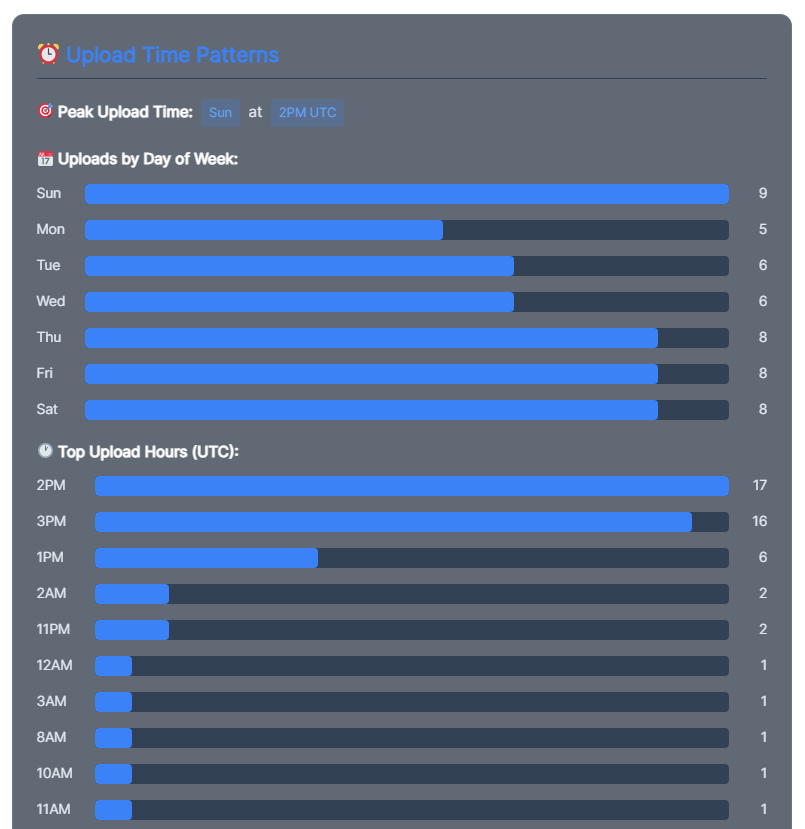
| Historical Upload Patterns | Optimal days of the week and exact hours for peak audience activity. | Schedule video releases 2 hours before your niche’s peak traffic window, allowing the algorithm time to process and index your metadata. |
Pro Tip on Viewer Retention: Advertisers pay the highest rates to appear on videos where users actually stay to watch. Use your channel analysis to pinpoint exactly where viewers historically drop off in your content format (usually around the 30-second mark or during long outtros) and redesign your scripts to eradicate those dead zones.
5. Overcoming the “Ghost Town Channel” Phenomenon
The most critical diagnostic function of a channel analyzer tool is diagnosing why an active channel has stopped growing—a frustrating state known as the “Ghost Town Channel” phenomenon. This happens when a channel has accumulated subscribers over the years, but its active view counts remain painfully low.
An analyzer helps you break this stagnation by pinpointing Content Decoupling.
Often, a channel gained thousands of subscribers years ago from a specific viral tutorial. If the creator changed directions to vlog about their daily life, the old audience remains subscribed but refuses to click. The analyzer highlights which core videos actually built your active subscriber foundation, allowing you to return to those roots and pivot back to topics that your audience genuinely signed up to see.
6. The Ultimate Channel Optimization Checklist
Before you upload your next video or kick off a channel redesign project, run your asset pipeline through this analytical checklist to ensure your channel is fully optimized for programmatic discovery:
- [ ] Checked competitor channels for breakout video topics over the last 90 days.
- [ ] Assessed channel tags to verify proper classification in YouTube’s index.
- [ ] Structured video lengths above 8 minutes to maximize AdSense mid-roll revenue opportunities.
- [ ] Cleaned out repetitive or outdated descriptions that trigger spam algorithms.
- [ ] Optimized video titles to prioritize highly clickable human phrasing over robotic keyword stuffing.
- [ ] Synced video release times with active historical viewership trends pulled from the tool.
By converting raw metric tracking into systematic content creation decisions, you eliminate the guesswork out of video production. Use data to build your blueprints, focus your creative energy on topics with proven audience demand, and watch your channel revenue scale predictably.