YouTube Video Embed Tool
Embed any YouTube video on your website, blog, or WordPress page with a fully responsive iframe. This tool ensures your video looks perfect on desktop, tablet, and mobile devices.
Responsive Video Preview:
Embed Code (Copy & Paste):
The embed is fully responsive on desktop, tablet, and mobile devices. Perfect for blogs, WordPress posts, and landing pages.
YouTube Embed Code Generator Tool: Simplify Video Sharing on Your Website
In today’s digital age, video content has become a crucial element for engaging audiences. Whether you are a blogger, a business owner, or a content creator, embedding YouTube videos into your website can significantly enhance the user experience. However, manually generating the embed code can sometimes be confusing or time-consuming. This is where the YouTube Embed Code Generator Tool comes in handy.
What is a YouTube Embed Code Generator Tool?
A YouTube Embed Code Generator Tool is an online utility that allows you to create the HTML embed code for any YouTube video quickly and easily. Instead of manually copying and customizing the embed code from YouTube, this tool lets you generate a ready-to-use snippet by simply entering the video URL and adjusting a few settings.
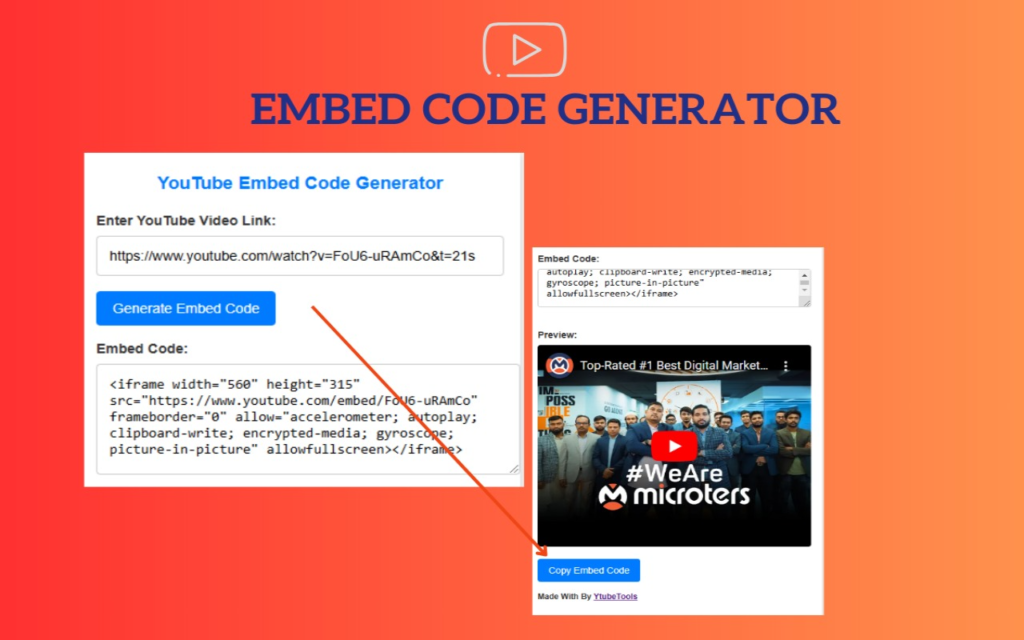
Key Features of the Tool
- Easy to Use: Just paste the YouTube video link, and the tool generates the embed code instantly.
- Customization Options: Adjust video size, enable or disable autoplay, control display of related videos, and more.
- Responsive Design: Generate embed codes that work seamlessly on desktops, tablets, and mobile devices.
- Privacy-Enhanced Mode: Some tools allow you to use YouTube’s privacy-enhanced mode, which limits tracking cookies.
Why Use a YouTube Embed Code Generator?
Manually embedding videos requires knowledge of HTML and can be prone to errors. The generator tool ensures that the embed code is correct and optimized for your needs. It saves time, reduces mistakes, and allows even beginners to integrate videos effortlessly.
How to Use a YouTube Embed Code Generator Tool
- Find the YouTube video you want to embed.
- Copy the video URL from the browser address bar.
- Paste the URL into the input field of the embed code generator tool.
- Customize the settings such as width, height, autoplay, and privacy mode.
- Click “Generate” to create the embed code.
- Copy the generated HTML code and paste it into your website’s source code or content management system.
Conclusion
The YouTube Embed Code Generator Tool is a practical and efficient solution to embed YouTube videos on your website without hassle. It empowers users of all technical levels to enhance their web content with engaging videos, improving visitor interaction and retention. Try using one today to elevate your website’s multimedia experience!