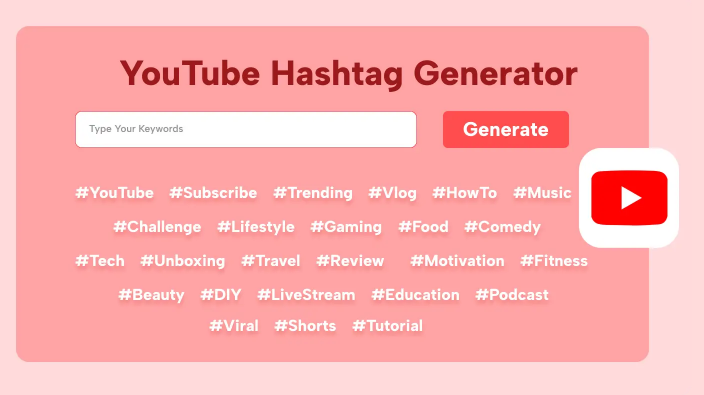
YouTube Trending Hashtag Generator
Discover the most popular hashtags from trending YouTube videos in any region
Filter Hashtags by Type or Keyword
Introduction: Why Hashtags are the “Digital Signposts” of 2026
In 2026, YouTube isn’t just a video platform; it’s the world’s most sophisticated visual search engine. While titles and thumbnails still grab the click, hashtags have evolved into the metadata bridges that connect your content to specific “clusters” of viewers.
Gone are the days of “hashtag stuffing.” The 2026 algorithm prioritizes semantic relevance. Using a YouTube Trending Hashtag Generator (Free) is no longer a luxury for big creators—it is a survival tool for anyone looking to break through the noise.
1. The Anatomy of a Modern YouTube Hashtag Generator
What makes a hashtag generator “high-tech” in 2026? It’s no longer a simple database of popular words. The best free tools now utilize NLP (Natural Language Processing) to analyze your video’s intent.
Key Features to Look For:
- AI-Driven Contextualization: The tool should “read” your video description or title and suggest tags that match the intent, not just the keyword.
- Search Volume vs. Competition Metrics: A good generator tells you if a tag is “Oversaturated” or a “Rising Star.”
- Multi-Format Optimization: Distinct suggestions for YouTube Shorts (which rely on high-velocity trends) versus Long-form videos (which rely on evergreen search).
- Cross-Platform Viral Analysis: In 2026, trends often start on TikTok or Instagram and migrate to YouTube. The best generators track this migration.
2. Top 5 Free YouTube Hashtag Generators in 2026
If you’re looking for the best bang for your buck (literally zero dollars), these tools are leading the market this year:
1. VidIQ Free Hashtag Tool
Still the industry leader, VidIQ’s 2026 update includes a “Trend Forecaster” that predicts which hashtags will peak in the next 48 hours.
2. TunePocket YouTube Advanced Generator
TunePocket offers a simplified interface that allows you to generate up to 15 optimized hashtags by simply entering your video category and a few seed keywords.
3. Planable AI Hashtag Suite
Planable’s free tool allows you to select the “tone” of your hashtags—whether you want them to be witty, professional, or purely SEO-focused.
4. Buffer’s AI Social Generator
Perfect for those who multi-stream, Buffer’s tool suggests hashtags that work specifically for the YouTube “Shorts Feed” versus the standard search results.
5. Google Trends (Hashtag Mode)
Often overlooked, Google Trends now has a dedicated “Social Metadata” section that shows the real-time velocity of specific hashtags across the Google ecosystem.
3. The “3-Tier” Hashtag Strategy for 2026
To maximize reach, you shouldn’t just pick random tags. Use the 3-Tier Method found in most premium generators:
Tier 1: The Broad Industry Tags (1-2 Tags)
These are high-volume tags that tell YouTube which broad bucket you belong in.
- Example:
#Gaming,#Cooking,#Tech.
Tier 2: The Niche Specifics (2-3 Tags)
These target your specific sub-audience. This is where you win the “Suggested Video” sidebar.
- Example:
#MechanicalKeyboards,#VeganKetoRecipes,#IndieGameDev.
Tier 3: The Branded/Unique Tag (1 Tag)
Always include a tag unique to your channel. This helps the algorithm “cluster” your videos together, making it more likely that a viewer will binge-watch your content specifically.
- Example:
#YourChannelName,#SeriesName2026.
4. YouTube Shorts vs. Long-Form: Different Rules Apply
One of the biggest mistakes creators make in 2026 is using the same hashtag strategy for both formats.
The Shorts Strategy:
Shorts are driven by Velocity. You need “Explosive” tags.
- Must-Have:
#Shorts(Essential for the algorithm). - Trending Tags: Always include 1-2 tags related to a current viral challenge.
- Count: Stick to 3-5 hashtags. Any more and you risk the “Spam” label in the Shorts Feed.
The Long-Form Strategy:
Long-form is driven by Authority. You need “Evergreen” tags.
- Search Intent: Focus on “How-to” tags or specific product names.
- Location Tags: If your content is local (e.g., a vlog in Tokyo), use location-specific hashtags to trigger the “Near Me” algorithm.
- Count: You can go up to 10-12, but the first three are the most important as they appear above your title.
5. Case Study: How #TechTrends2026 Went Viral
In early 2026, a small creator used a free generator to find a “gap” in the tech niche. While everyone was using #AI, the generator suggested #LocalLLM and #PrivacyFirstAI.
Because these tags had High Search Volume but Low Competition, the video was picked up by the “Suggested” algorithm within 4 hours, resulting in 200,000 views for a channel with only 500 subscribers. This is the power of using data over guesswork.
6. Common Pitfalls: Why Your Hashtags Aren’t Working
Even with a generator, you can fail if you fall into these traps:
- Hashtag Stuffing: YouTube ignores videos with more than 15 hashtags. If you use 60, none of them will count.
- Irrelevant Tags: Using
#MrBeaston a knitting tutorial will get your video shadowbanned for being misleading. - Outdated Trends: Using a trend from 2024 in 2026 makes your content look stale to the “Freshness” algorithm.
7. Future-Proofing: Beyond 2026
As we look toward 2027, YouTube is testing Voice-Activated Hashtags and AI-Generated Metadata that creates tags during the upload process based on your video’s audio. Staying ahead means using generators that are already integrating these AI features today.
Summary Table: Quick Hashtag Checklist
| Feature | Long-Form Video | YouTube Shorts |
| Optimal Count | 5–10 | 3–5 |
| Primary Goal | Search Ranking (SEO) | Feed Velocity (Viral) |
| Key Tag | Niche-specific | #Shorts |
| Placement | Bottom of Description | Title or First Line |
Conclusion: Start Your Growth Engine Today
Using a YouTube Trending Hashtag Generator Free 2026 is the simplest way to give the algorithm what it wants: Context. By spending just two minutes researching your tags before you hit “Publish,” you can significantly increase the “Shelf Life” of your videos.